Matt Jones · 31 May 2026
Leads in Google Ads: The New Built-In CRM for Lead Management
Google Ads now has a built-in Leads view that works like a lightweight CRM, with lead stages for raw, qualified, converted and lost. Here is what it does, the 60-day privacy limit to plan around, and how we use it to optimise bidding towards leads that actually close.
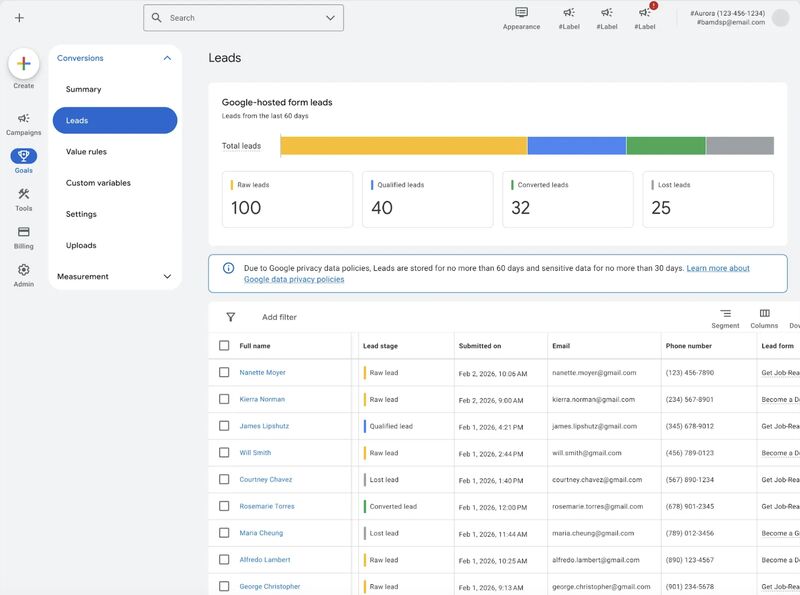
Google has quietly added something to Google Ads that paid media teams have wanted for years: a place to see and manage your actual leads, inside the platform that generated them. The new Leads view sits under Goals and Conversions, and it turns the screen where you usually just count form fills into something closer to a lightweight CRM.
As a paid media team that runs lead generation accounts every day, we think this is one of the more useful additions Google has shipped in a while. Here is what it actually does, what it does not, and how we plan to use it for clients.
What "Leads in Google Ads" actually is
If you run Google-hosted lead forms, whether that is a lead form extension or a form tied to your campaigns, Google now collects every submission into a single Leads table. You will find it under Goals, then Conversions, then Leads. Instead of a lead being a number on a conversion report, it becomes a row you can see, sort and act on.
Each lead carries the detail you would expect from a basic CRM: full name, email, phone number, the form they completed and the date they submitted. Above the table, Google summarises the pipeline into four counts. In the example we have been looking at that is 100 raw leads, 40 qualified, 32 converted and 25 lost.
Lead stages are the important bit
The detail that matters most here is the lead stage. Every lead can be marked as one of four states:
- Raw lead: a fresh submission that has not been reviewed yet.
- Qualified lead: someone who fits your criteria and is worth pursuing.
- Converted lead: a lead that turned into a customer or a deal.
- Lost lead: a contact that went nowhere.
That single field is what separates this from a vanity conversion count. For years the gap in lead generation advertising has been the same: Google optimises towards the form fill, but your business only cares about the qualified and converted ones. Two campaigns can show an identical cost per lead while one produces buyers and the other produces tyre kickers. Lead stages give you a native way to tell those two campaigns apart.
Why this matters for performance, not just reporting
Looking at clean lead data in one place is nice. Feeding that data back into bidding is where the value sits. When you tell Google which leads were qualified or converted, you are handing Smart Bidding a far better signal than a raw form count. Over time that should pull spend towards the audiences, keywords and placements that produce real pipeline, and away from the ones that just produce easy clicks.
This is the same principle behind offline conversion tracking and value-based bidding, which we have set up through CRMs for larger clients for a long time. The difference is that the Leads view lowers the barrier. A smaller advertiser who never had the resource to wire up an offline conversion import can now manage lead quality directly in the interface, with no developer and no integration project.
The privacy limits you need to plan around
Google is clear that this is not a permanent store of your customer data. Because of its data privacy policies, leads are held for no more than 60 days, and sensitive fields are kept for no more than 30 days. After that, the records age out.
That single rule shapes how you should treat the feature. The Leads view is a working surface for live pipeline and for sending quality signals back to your campaigns. It is not your system of record. If you want a lasting history of who enquired, when, and what happened to them, that still belongs in a proper CRM. Anyone relying on this table as their only copy of lead data will lose it on a rolling basis.
How we are using it at Clicky
Our approach is to treat the Leads view as the bridge between the ad click and the sales outcome, not as a replacement for either side. In practice that means a few things:
- Reviewing raw leads quickly and marking stages honestly, so the data Google learns from reflects real quality rather than wishful thinking.
- Using the qualified and converted counts to judge campaigns and keywords on pipeline, not on cost per form fill.
- Still exporting leads into the client CRM for nurture, attribution and long-term reporting, because the 60-day window makes that non-negotiable.
- Feeding stage data back as a conversion signal so bidding optimises towards the leads that actually close.
Used that way, this is a genuine step forward for lead generation accounts. It will not replace a CRM, and it should not try to. What it does is close the loop between the money you spend and the leads that are worth having, inside the platform doing the spending. For most advertisers running Google lead forms, that is exactly the data point that has been missing.
If you want help setting up lead stages, value-based bidding or full offline conversion tracking on your account, get in touch with our paid media team.